Introduction
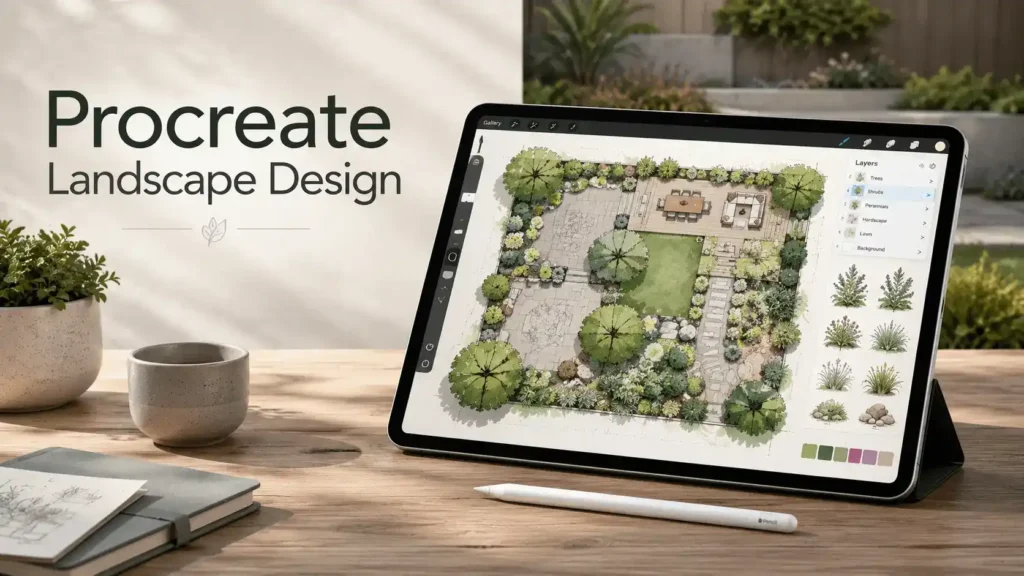
Procreate landscape design refers to using the Procreate app on iPad to create digital sketches, garden layouts, and outdoor planning concepts. Designers, homeowners, and gardening enthusiasts commonly use Procreate for landscape visualization because it offers flexible drawing tools, Apple Pencil support, and intuitive layer-based editing. Unlike CAD-based landscape architecture software, Procreate focuses on artistic illustration and conceptual planning rather than technical drafting or construction documentation. Many users prefer it for brainstorming outdoor living spaces, testing plant arrangements, and building presentation visuals quickly. Using Procreate for landscape design allows users to combine creativity with practical planning while maintaining a simple and portable digital workflow.
Quick Summary
- Procreate can be used to create digital landscape and garden design concepts directly on iPad devices.
- Landscape designers use brushes, templates, layers, and perspective tools to visualize outdoor spaces efficiently.
- Procreate works best for conceptual planning and presentation sketches rather than technical construction drawings.
- Free and premium brushes, templates, and tutorials help improve workflow speed and presentation quality.
- Using Procreate for landscape design supports creative ideation, fast revisions, and portable garden planning.
What Is Procreate Landscape Design?
Procreate landscape design is the process of creating digital outdoor layouts, garden concepts, and landscape illustrations using the Procreate drawing app on iPad. It combines artistic sketching with functional space planning to help users visualize landscapes before implementation. Although Procreate is useful for conceptual visualization, professional landscape architecture typically requires technical drafting and construction documentation tools.
Digital landscape design within Procreate focuses on conceptual visualization rather than engineering precision. Users create pathways, planting zones, patios, pools, outdoor kitchens, and garden layouts using customizable brushes and layers.
There is an important difference between artistic landscape illustration and professional landscape architecture drafting:
- Artistic illustration prioritizes creativity and visual presentation.
- Professional drafting focuses on measurements, permits, grading, and construction accuracy.
Because of this distinction, procreate garden design is widely used during the early conceptual stages of projects. Designers often use Procreate for landscape presentations before moving final plans into CAD software.
Using Procreate for landscape design is especially popular among:
- Landscape designers
- Garden consultants
- Interior-outdoor stylists
- Homeowners planning renovations
- Gardening enthusiasts
How Procreate Is Used in Landscape and Garden Planning
Procreate for landscape workflows typically begins with rough conceptual sketching. Users can rapidly test ideas without the complexity of technical drafting software.
Common uses include:
- Concept sketches
- Garden layout visualization
- Plant placement planning
- Outdoor entertainment area concepts
- Patio and pathway planning
- Mood boards
- Client presentation sheets
Professionals often use layered workflows to separate:
- Hardscape elements
- Planting layouts
- Lighting concepts
- Water features
- Furniture placement
Beginners usually start with imported property photos or basic templates. Professionals often combine hand-drawn sketches with digital rendering for faster revisions and cleaner presentations. Many homeowners combine digital planning techniques with practical plant selection resources such as the Plants: Benefits and Guides (Complete Care, Types & Growing Tips) pillar article when organizing garden layouts and planting zones.
Is Procreate Good for Landscape Design?
Yes, Procreate is good for landscape design when the goal is conceptual visualization, creative ideation, or presentation-quality sketches. It is especially effective for fast outdoor planning and digital garden illustrations.
Key strengths include:
- Portable iPad workflow
- Responsive Apple Pencil support
- Fast concept iteration
- Layer-based organization
- Extensive brush customization
- Easy color experimentation
Many users consider procreate landscape design software highly efficient for early-stage planning because revisions can be made quickly without redrawing entire layouts.
However, there are limitations:
- No CAD-level measurement precision
- Limited technical documentation tools
- No automated scaling system
- No grading or engineering calculations
- Limited construction-ready output
For this reason, Procreate works best alongside professional drafting tools rather than replacing them entirely.
Getting Started With Procreate for Landscape Design
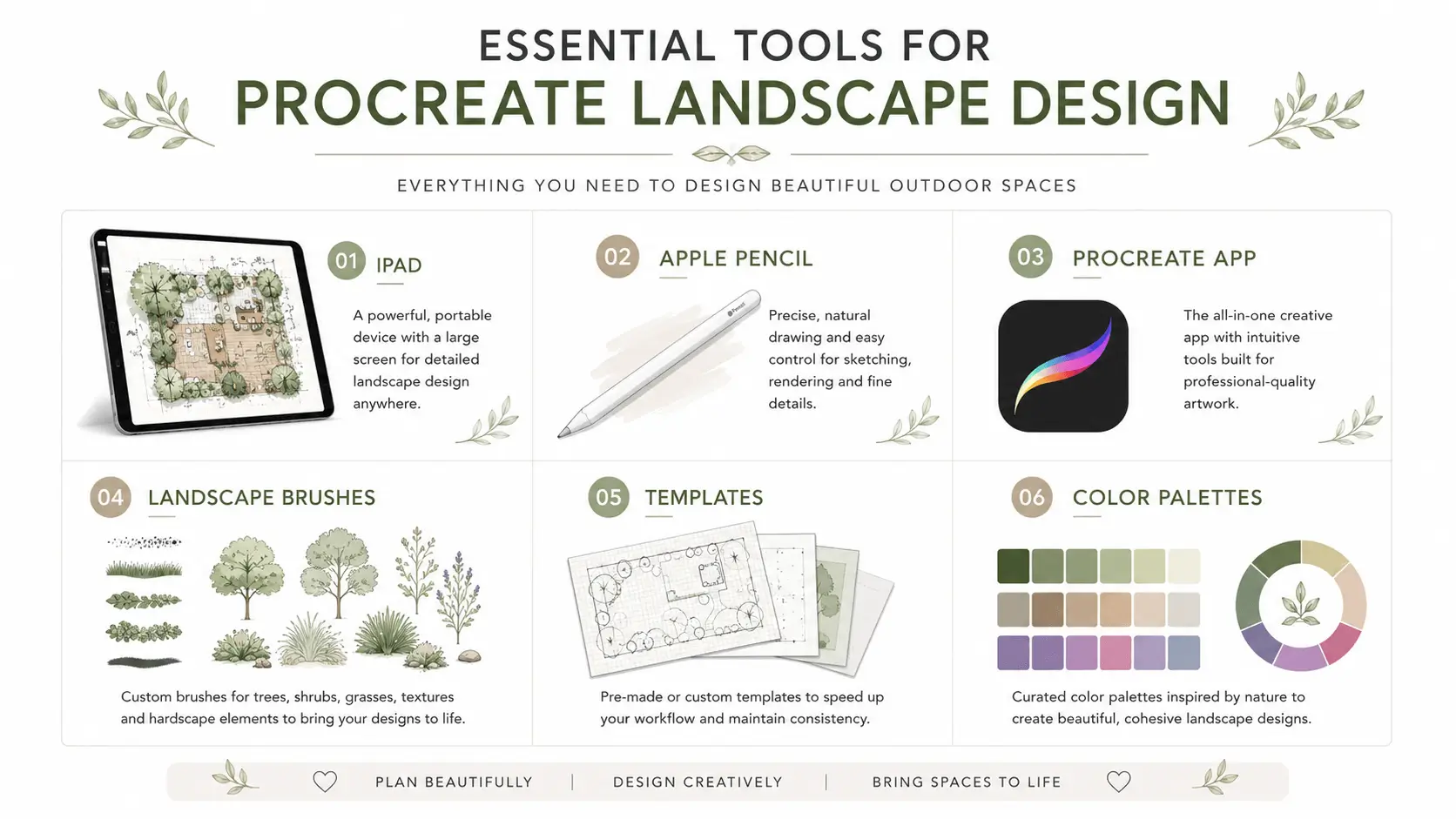
Starting with Procreate for landscape planning requires only a few tools:
- iPad
- Apple Pencil
- Procreate app
The ipad procreate workflow is popular because it combines portability with pressure-sensitive drawing precision.
Beginners should customize their workspace before starting:
- Create landscape-oriented canvases
- Organize brush libraries
- Set up color palettes
- Create layer naming systems
- Import grid templates
The procreate drawing app allows users to simplify their interface, which helps improve workflow speed and organization.
Many beginners also create reusable templates for:
- Garden plans
- Backyard layouts
- Planting maps
- Patio concepts
Essential Canvas Settings for Landscape Layouts
Proper canvas setup improves organization and export quality.
Important settings include:
Canvas Size
Large canvases improve detail visibility. Common dimensions include:
- 3000 × 2000 px
- 4000 × 3000 px
Resolution Settings
A resolution of 300 DPI is commonly recommended for print-quality presentation sheets.
Layer Management
Higher resolutions reduce available layers. Users should balance image quality with workflow flexibility.
Export Formats
Common export formats include:
- PNG
- JPEG
- PSD
Proper setup improves editing efficiency and presentation consistency throughout the project.
Best Brushes for Landscape and Garden Sketching
Brushes significantly affect presentation quality and workflow speed.
Popular procreate landscape design brushes include:
- Grass texture brushes
- Tree foliage brushes
- Watercolor brushes
- Soil texture brushes
- Hard-edge planning brushes
Many users download procreate landscape design brushes free from digital marketplaces and design communities.
Free brushes are useful for beginners, while premium brushes often provide:
- Better texture detail
- More realistic rendering
- Commercial licensing
- Larger brush libraries
Professional designers often combine technical planning brushes with watercolor rendering tools for presentation visuals.
Using Layers and Perspective Tools Effectively
Layers improve organization and editing flexibility.
Common layer workflows include:
- Base map layer
- Hardscape layer
- Plant layer
- Lighting layer
- Shadow layer
- Annotation layer
Foreground and background separation improves visual depth and readability.
Perspective grids help users create realistic outdoor scenes. These tools are useful for:
- Patio visualization
- Deck rendering
- Pathway alignment
- Outdoor seating layouts
Efficient layer naming systems reduce editing confusion during larger projects.
Step-by-Step Process for Creating a Landscape Design in Procreate
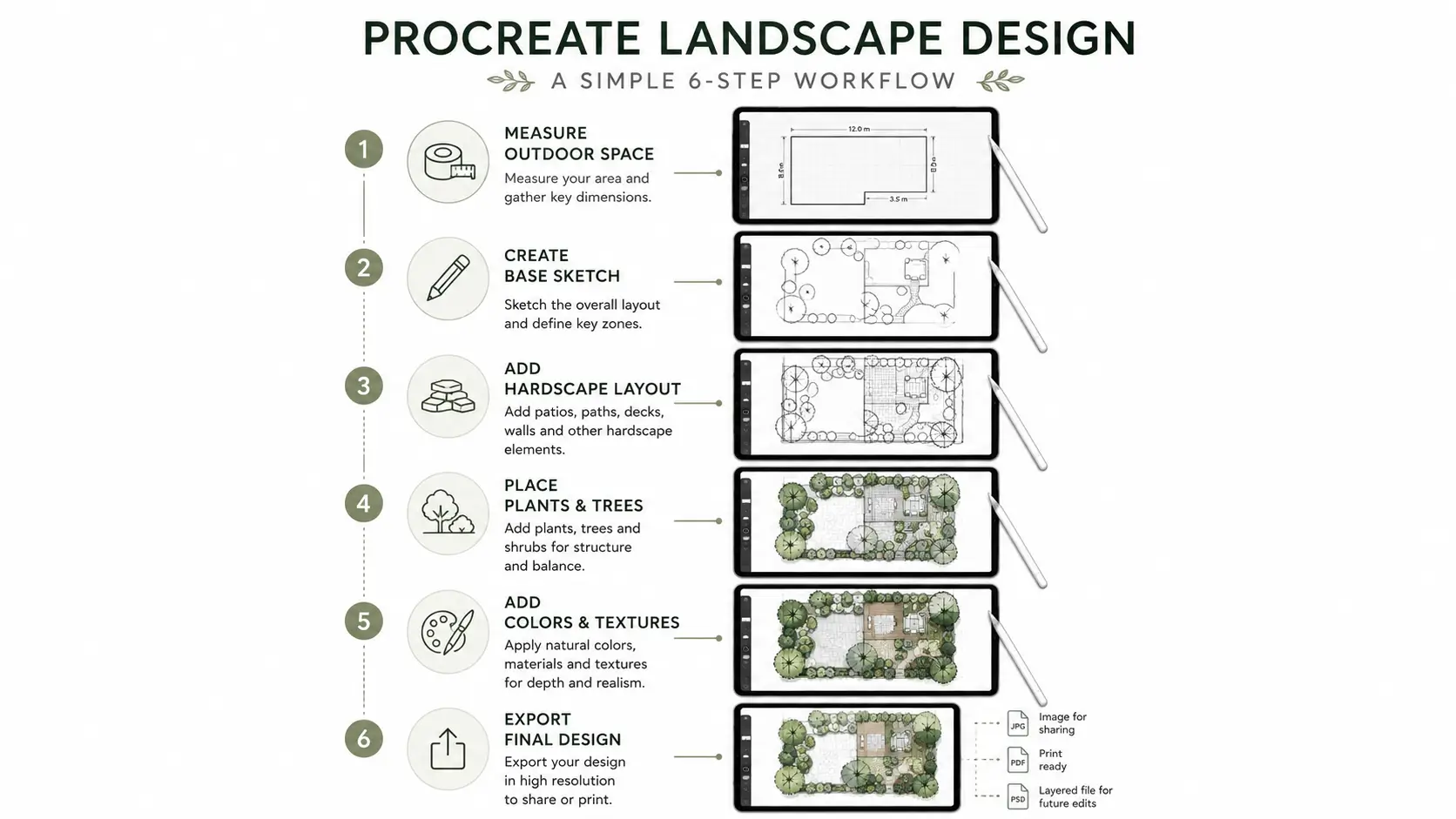
The process of how to make a landscape on Procreate usually follows a structured workflow optimized for conceptual planning.
Typical workflow steps include:
- Measure the outdoor space
- Import reference images
- Create a rough layout
- Define hardscape areas
- Add planting zones
- Apply textures and colors
- Add shadows and depth
- Export final presentation files
Many beginners improve quickly by following a procreate landscape design tutorial focused on layer management and perspective drawing.
Planning the Outdoor Space
Landscape planning begins with understanding the physical environment.
Important considerations include:
- Property dimensions
- Sunlight exposure
- Drainage patterns
- Existing trees
- Access pathways
- Seating zones
Functional planning improves usability and prevents overcrowding.
Common beginner mistakes include ignoring mature plant size and underestimating walkway spacing.
Creating the Base Sketch
The base sketch establishes overall composition and layout structure.
This stage includes:
- Rough composition blocking
- Pathway outlines
- Patio positioning
- Plant grouping
- Seating placement
Most designers begin with simplified geometric shapes before adding details.
Keeping the initial sketch simple improves revision flexibility and prevents unnecessary complexity.
Adding Colors, Textures, and Plant Details
Colors and textures improve readability and presentation quality.
Conceptual rendering styles use simplified forms and loose textures. Realistic rendering styles include detailed shading and plant textures.
Common rendering additions include:
- Grass textures
- Mulch shading
- Water reflections
- Stone textures
- Tree canopies
Balanced color palettes improve visual cohesion and reduce visual clutter.
Finalizing and Exporting the Design
Final presentation preparation includes cleanup, labeling, and exporting.
Popular export formats include:
- PNG for presentations
- JPEG for sharing
- PSD for editing
- PDF for print layouts
Many users save a procreate landscape design pdf version for client presentations or contractor communication.
Backup storage and organized file naming improve long-term project management.
Procreate Landscape Design Templates and Resources
Templates improve speed, consistency, and organization.
Popular procreate landscape design template categories include:
- Garden plans
- Backyard concepts
- Patio layouts
- Outdoor kitchen plans
- Presentation sheets
Users searching for procreate landscape design free resources often download starter templates that include:
- Layer organization
- Perspective grids
- Plant symbols
- Color palettes
Templates help beginners avoid repetitive setup work.
Free vs Premium Landscape Design Templates
Free and premium templates differ in flexibility and detail.
| Feature | Free Templates | Premium Templates |
| Customization | Basic | Advanced |
| Brush Variety | Limited | Extensive |
| Commercial Use | Sometimes restricted | Usually included |
| Design Complexity | Beginner-focused | Professional-level |
Premium resources often include advanced organizational systems and presentation-ready layouts.
Where Designers Find Inspiration and Design Ideas
Design inspiration helps users explore layout possibilities and outdoor aesthetics.
Popular sources include:
- Botanical gardens
- Landscape magazines
- Pinterest boards
- Architectural websites
- Native plant collections
Common procreate design ideas include:
- Modern minimalist gardens
- Mediterranean courtyards
- Japanese-inspired layouts
- Tropical landscapes
- Drought-tolerant gardens
Mood boards help organize themes, textures, and color directions before sketching begins. Designers often explore themed layouts such as modern tropical gardens, minimalist courtyards, and Australian Cottage Garden concepts when developing mood boards in Procreate.
Comparing Procreate With Other Landscape Design Tools
Procreate focuses on creative illustration, while many landscape platforms prioritize technical drafting.
Illustration-focused tools are better for:
- Visual storytelling
- Presentation sketches
- Rapid brainstorming
Technical landscaping software is better for:
- Construction plans
- Accurate measurements
- Grading documentation
- Permit drawings
Many professionals combine both workflows for maximum efficiency.
Procreate vs Traditional Landscape Design Software
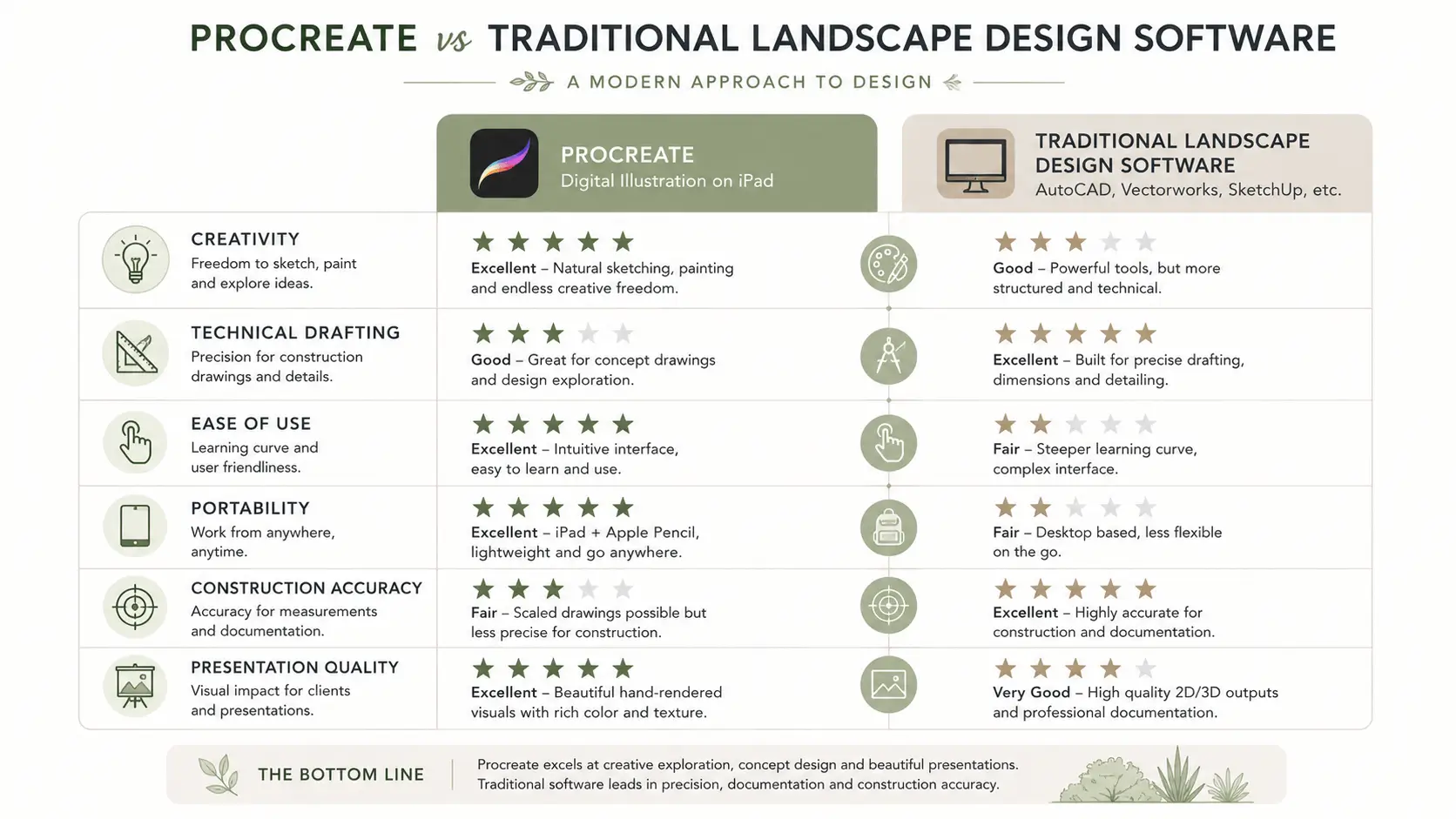
Procreate landscape design software differs significantly from CAD-based programs.
| Tool Type | Best For | Strengths | Limitations |
| Procreate | Concept design | Creativity and speed | Limited technical precision |
| CAD Software | Construction plans | Measurement accuracy | Steeper learning curve |
| Online Design Tools | Quick planning | Accessibility | Limited artistic flexibility |
Traditional landscaping design program free online platforms often include drag-and-drop planning systems but lack artistic rendering flexibility.
Free Online Landscape Design Tools Compared to Procreate
Several browser-based alternatives support simple landscape planning.
Common options include:
- Garden Planner
- SketchUp Free
- Planner 5D
- SmartDraw
These free online landscape design tool platforms provide:
- Prebuilt objects
- Measurement tools
- Drag-and-drop layouts
- Basic 3D previews
However, Procreate offers greater artistic freedom and presentation quality.
Users comparing free landscape design online platforms often choose Procreate for creativity and online landscape design tools for precision planning.
Garden Design Apps and Software Options
Garden planning software varies widely in functionality.
Common categories include:
Mobile Apps
Designed for portability and quick sketching.
Desktop Programs
Provide advanced drafting and technical controls.
Online Planners
Allow browser-based planning without installation.
Popular options include:
- Garden Planner
- SketchUp
- iScape
- Planner 5D
Users searching for the best free landscape design app often prioritize simplicity, while professionals focus on technical capability.
Landscape Design Apps and Software in Australia
Australian users often prioritize climate-aware landscape planning tools.
Popular searches include:
- free garden design app australia
- landscape design app australia
- free landscape design software australia
Australian landscape planning commonly considers:
- Water restrictions
- Heat tolerance
- Native species
- Bushfire resilience
Many australian landscape design software users combine Procreate visualization with climate-specific gardening resources.
Designing for Australian Climate Conditions
Australian landscapes often require drought-tolerant planning strategies.
Important considerations include:
- Native plant integration
- Water-efficient irrigation
- Shade management
- Heat-resistant paving materials
Popular native plants include:
- Kangaroo Paw
- Grevillea
- Lomandra
- Bottlebrush
Water-wise planning improves sustainability and long-term maintenance efficiency. Small-space planning techniques and native planting combinations can also be inspired by practical Small Native Garden Ideas in Australia for water-efficient outdoor layouts.
Common Mistakes When Using Procreate for Landscape Design
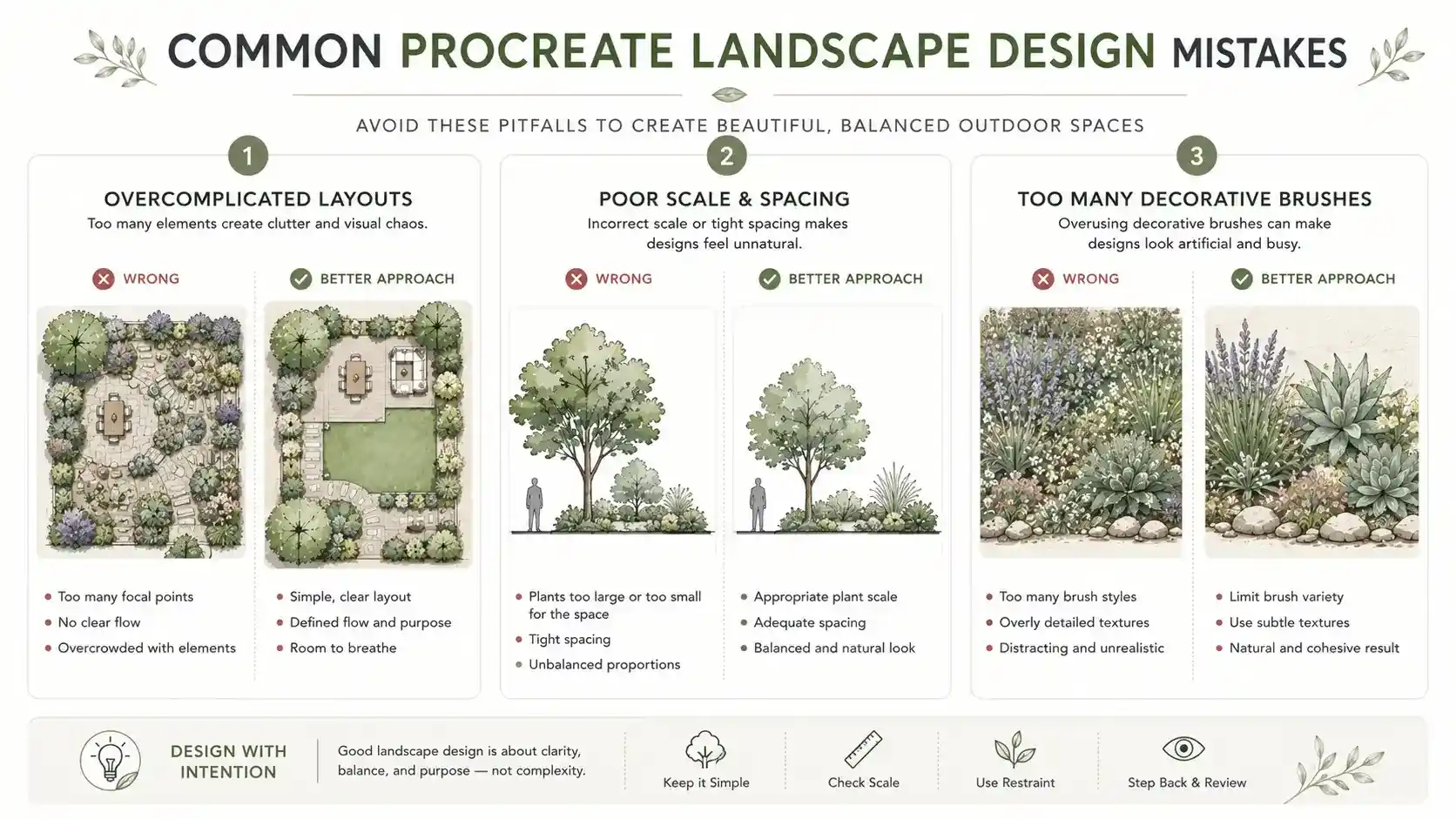
Several workflow mistakes reduce design clarity and usability.
Overcomplicating the Initial Layout
Simple layouts improve readability and revision flexibility.
Beginners often add excessive detail too early, making edits difficult later.
Ignoring Scale and Spatial Relationships
Accurate spacing is essential for functional outdoor planning.
Common issues include:
- Oversized furniture
- Narrow pathways
- Crowded plant spacing
- Poor movement flow
Using reference dimensions improves realism and usability.
Using Too Many Decorative Brushes
Excessive textures reduce clarity.
Over-rendering can make conceptual plans difficult to interpret, especially during presentations.
Professional workflows typically prioritize clean organization over decorative complexity.
Practical Tips to Improve Landscape Designs in Procreate
Small workflow improvements significantly increase efficiency.
Helpful techniques include:
- Using reusable templates
- Organizing layers early
- Creating saved color palettes
- Using clipping masks for textures
- Building custom brush libraries
Professional presentation quality often depends more on organization than artistic complexity.
Organizing Layers for Faster Editing
Layer organization improves workflow efficiency.
Useful naming systems include:
- Hardscape
- Plants
- Shadows
- Lighting
- Labels
Grouping layers by category reduces editing confusion during revisions.
Color-coding layer groups also improves navigation speed.
Using Color Palettes for Cohesive Outdoor Designs
Color palettes improve visual balance and readability.
Popular outdoor palette strategies include:
- Earth-tone palettes
- Native landscape palettes
- Seasonal palettes
- Desert-inspired color schemes
Balanced contrast improves clarity without overwhelming the composition.
Natural tones often create more realistic and visually calming presentations.
Combining Hand Sketches With Digital Rendering
Many designers combine traditional sketches with Procreate rendering.
Common hybrid workflow:
- Create rough pencil sketch
- Photograph or scan sketch
- Import into Procreate
- Trace and refine digitally
- Add colors and textures
This process preserves hand-drawn creativity while improving presentation quality and editing flexibility.
Conclusion
Procreate landscape design provides a flexible and highly creative approach to garden visualization, outdoor planning, and conceptual landscape illustration. It works especially well for brainstorming layouts, testing planting concepts, and building presentation-quality visuals on iPad. While Procreate does not replace professional CAD software for technical drafting or construction documentation, it remains one of the most effective tools for creative ideation and rapid concept development. Using Procreate for landscape design becomes more efficient when users combine organized layers, high-quality brushes, templates, and practical planning principles. With the right workflow, Procreate can significantly improve landscape communication, visualization, and design flexibility.
Frequently Asked Questions
What is Procreate landscape design?
Procreate landscape design is the process of creating digital outdoor layouts, garden plans, and landscape concepts using the Procreate app on iPad.
Is Procreate good for landscape design beginners?
Yes, Procreate is beginner-friendly because it offers intuitive drawing tools, customizable brushes, and a portable workflow suitable for conceptual planning.
How do you make a landscape design in Procreate?
Users typically start by measuring the space, creating a base sketch, organizing layers, adding textures and colors, and exporting the final design.
Can Procreate replace professional landscape design software?
No, Procreate is best for conceptual illustration and presentation work rather than technical drafting or construction documentation.
Are there free Procreate landscape design brushes available?
Yes, many free landscape brushes are available through digital marketplaces, design forums, and Procreate resource websites.